


Here could be
your commercials
If interested
email to:
fodb-development@gmx.de
or use the contact form in the impressum
Here a bit more detailed documentaion in addition to the simple documentaion
The following images decribe the ways the FODB is intended to use. In generall there are 3 Ways. Via CMD-Tool (CMD and programatically), via SQL-Helper-GUI, or Via Direct Core Call. CORE-NAMES:
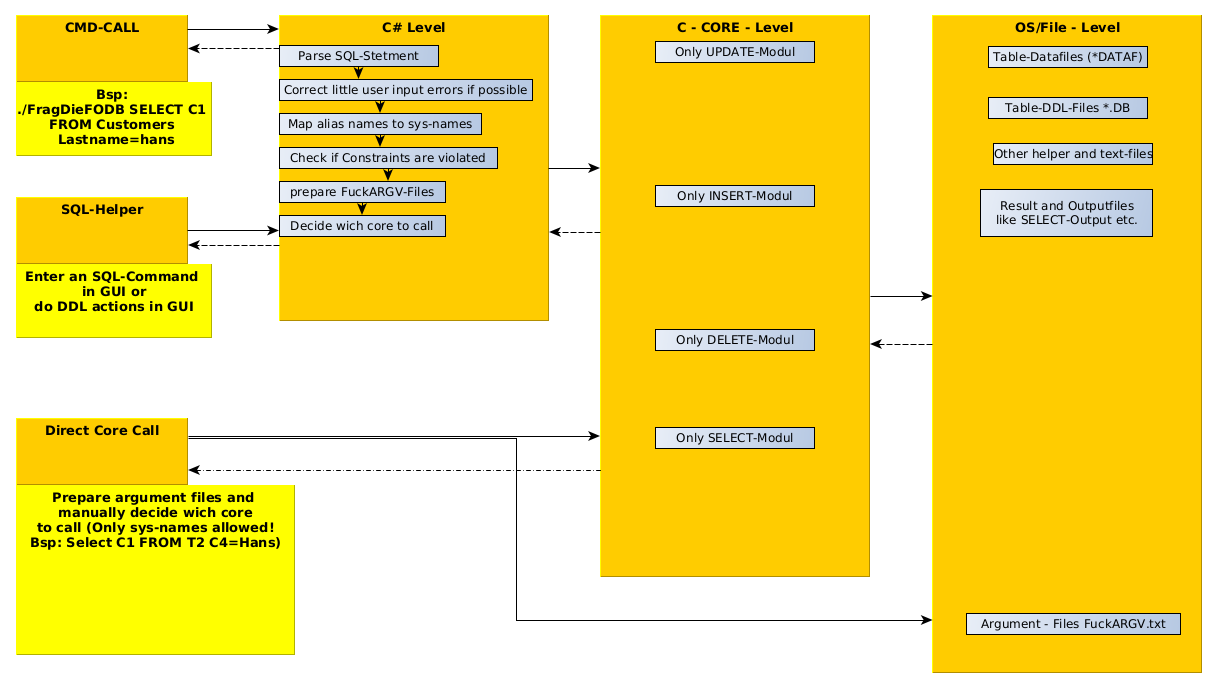
the next image shows the example use cases of how to use the FODB
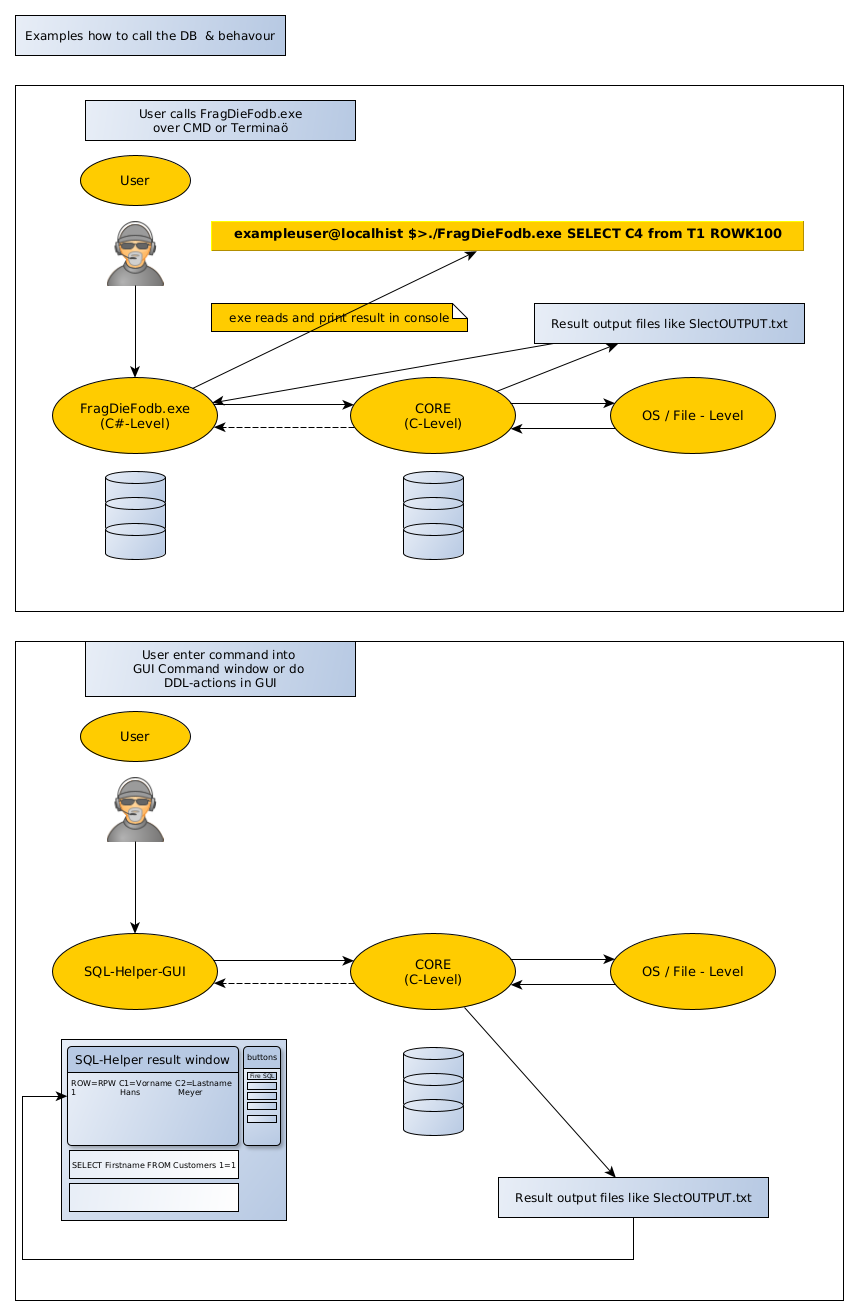
If you realy need ultra high performance you can prepare the statement programatically and fire, depending of the kind of operation the corresponding C-Core

DETAILED FILE EXPLAINATIOIN AND CALLING HINTS:
ARGUMENT-FILES THAT HAS TO BE PREPARED BEFORE EACH CALL in Windows or Linux:
CASE SELECT:
FUCKargvT5 --> WHERE/CONDITION-CLAUSE --> Bsp.: 1=1
FUCKargvT4 --> TABLE-CLAUSE --> Bsp.: T4
FUCKargvT3 --> FROM-CLAUSE --> the FROM-Keyword
FUCKargvT2 --> COLUMN-CLAUSE --> Bsp.: C2;C8;C13;C20
FUCKargvT1 --> STATEMENT-CLAUSE --> the SELECT-Keyword
CASE INSERT:
FUCKargvT5 --> NONE
FUCKargvT4 --> VALUE-CLAUSE --> Bsp.: This;i s;a;very;boring;example;sentence
FUCKargvT3 --> TABLE-CLAUSE --> Bsp.: T2
FUCKargvT2 --> IINTO-CLAUSE --> the INTO_Keyword
FUCKargvT1 --> STATEMENT-CLAUSE --> the INSERT-Keyword
CASE UPDATE:
FUCKargvT5 --> NONE
FUCKargvT4 --> WHERE/CONDITION-CLAUSE --> Bsp.: sallary=48.000€
FUCKargvT3 --> SET-CLAUSE --> sallary=80.000€
FUCKargvT2 --> TABLE-CLAUSE --> Bsp.: T9
FUCKargvT1 --> STATEMENT-CLAUSE --> the UPDATE-Keyword
CASE_DELETE:
FUCKargvT5 --> NONE
FUCKargvT4 --> NONE
FUCKargvT3 --> CONDITION-CLAUSE --> Bsp.: C8=43359
FUCKargvT2 --> TABLE-CLAUSE --> Bsp.: T5
FUCKargvT1 --> STATEMENT-CLAUSE --> the DELETE-Keyword
CORE NAMES :
Windows :
FODB_CORE_4p10p10_NurSel.exe --> SELECT
FODB_Core4p10_NUR_UPD.exe --> UPDATE
FODB_Core4p10_NUR_DEL --> DELETE
FODB_GUI_VERSION_WIN_2p4p8.exe --> INSERT
CMD-Version: FragDieFodb.exe
Linux Ubuntu :
fodb_ubunt_2021_nurupd --> UPDATE
fodb_ubunt_2021_nursel --> SELECT
fodb_ubunt_2021_nurdel --> DELETE
fodb_ubunt_2021_nurins --> INSERT
Linux :
Terminal-Version: (like in Windows) FragDieFodb.exe
GUI-APPLICATIONS:
Linux Ubuntu: FODB_LinuxGlade....exe
Windows: FODB_...GUI_V2.exe
Download Here :